C Program Compilation Steps (Deep Dive)
When we run a C program, we are not directly executing the .c file.
A C source file goes through multiple stages before it becomes an executable.
✅ Preprocessing → Compilation → Assembling → Linking → Loading/Runtime
Overall Pipeline
main.c
  |
  |  (1) Preprocessor
  v
main.i
  |
  |  (2) Compiler
  v
main.s
  |
  |  (3) Assembler
  v
main.o
  |
  |  (4) Linker (+ libraries)
  v
main (executable)
  |
  |  (5) OS Loader
  v
Running Process (in memory)
C Program Build + Run Pipeline Diagram
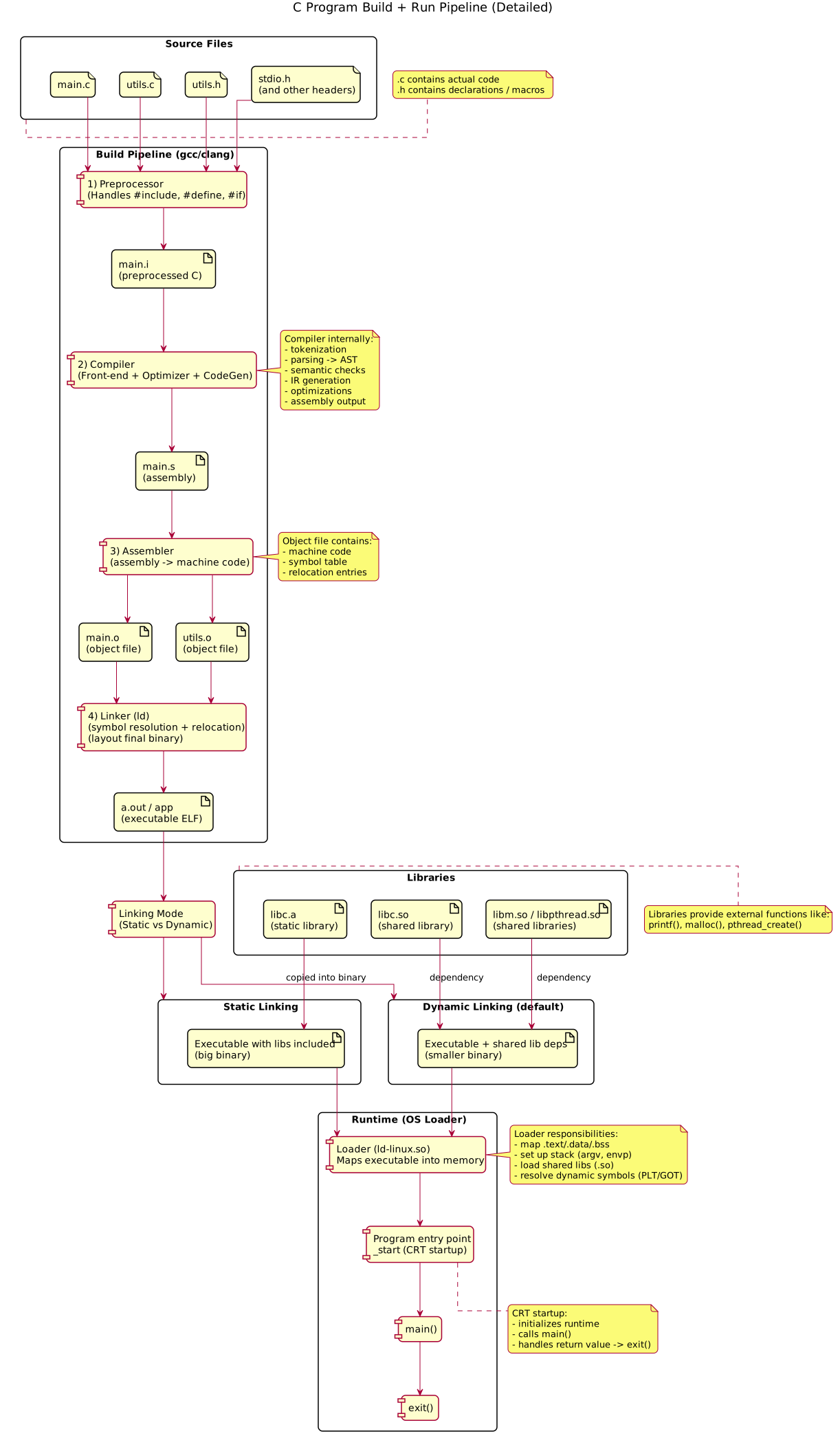 {:class=“diagram-img”}
Detailed compilation pipeline diagram showing preprocessing, compilation, assembling, linking, static vs dynamic linking.
0) Source Code (.c)
Example program:
#include <stdio.h>

int x = 10;

int main() {
    printf("Hello %d\n", x);
    return 0;
}
1) Preprocessing (.c → .i)
Preprocessor performs text-based transformations before compilation.
What happens?
- expands header files (
#include) - replaces macros (
#define) - applies conditional compilation (
#if,#ifdef, …) - removes comments
Command
gcc -E main.c -o main.iWhy useful?
If you suspect macro/header related issues, inspect main.i.
2) Compilation (.i → .s)
Compilation converts preprocessed C code into assembly.
Internal stages inside the compiler
-
Lexical analysis (tokenization)
Converts raw text to tokens likeint,main,{,} -
Parsing
Builds AST (Abstract Syntax Tree) using grammar rules -
Semantic analysis
Type checking, prototype matching, conversions -
Optimization
Examples:- constant folding
- dead code elimination
- common subexpression elimination
- function inlining (optional)
-
Code generation
Converts intermediate representation (IR) to assembly
Command
gcc -S main.i -o main.sOutput file:
main.s= assembly code
3) Assembling (.s → .o)
Assembler converts assembly into machine code.
Command
gcc -c main.s -o main.oOutput:
main.o= object file (binary)
Object file contains
- machine instructions
- symbol table (names of functions/variables)
- relocation info (placeholders for addresses)
Useful tool:
nm main.o4) Linking (.o + libs → executable)
Linker combines your object files and required libraries to produce final executable.
Why linking is needed?
Your code may call external functions like printf().
printf() is not inside your main.o — it is in the C standard library.
So linker resolves:
- undefined symbols
- library references
- final addresses for code & globals
Command
gcc main.o -o mainStatic vs Dynamic Linking
Dynamic linking (default)
- executable uses shared libraries (
.sofiles) - libraries loaded at runtime
Check:
ldd ./mainStatic linking
- library code gets copied into executable
- bigger executable but no
.sodependency
gcc -static main.c -o main5) OS Loader Stage (Runtime)
When you run:
./mainThe OS loader:
- maps executable into memory (text/data/bss)
- maps shared libraries
- creates stack (argv/envp)
- prepares heap region
- jumps to entry point
_start
Then startup code calls main().
Check entry point:
readelf -h main | grep EntryUseful gcc option: keep intermediate files
gcc -save-temps main.c -o mainThis generates .i, .s, .o files automatically.
Quick Interview Summary
- Preprocess: expands headers/macros
- Compile: C → Assembly (AST + IR + optimization)
- Assemble: Assembly → Object (
.o) - Link: Objects + libs → Executable
- Load: OS maps memory and starts program (
_start → main)